Lead pages and leads
A lead page is what a customer sees after a scan: your business name, a headline, a short form, and an optional Call now button. Every message comes to you by email and stays in your dashboard.
What the customer sees
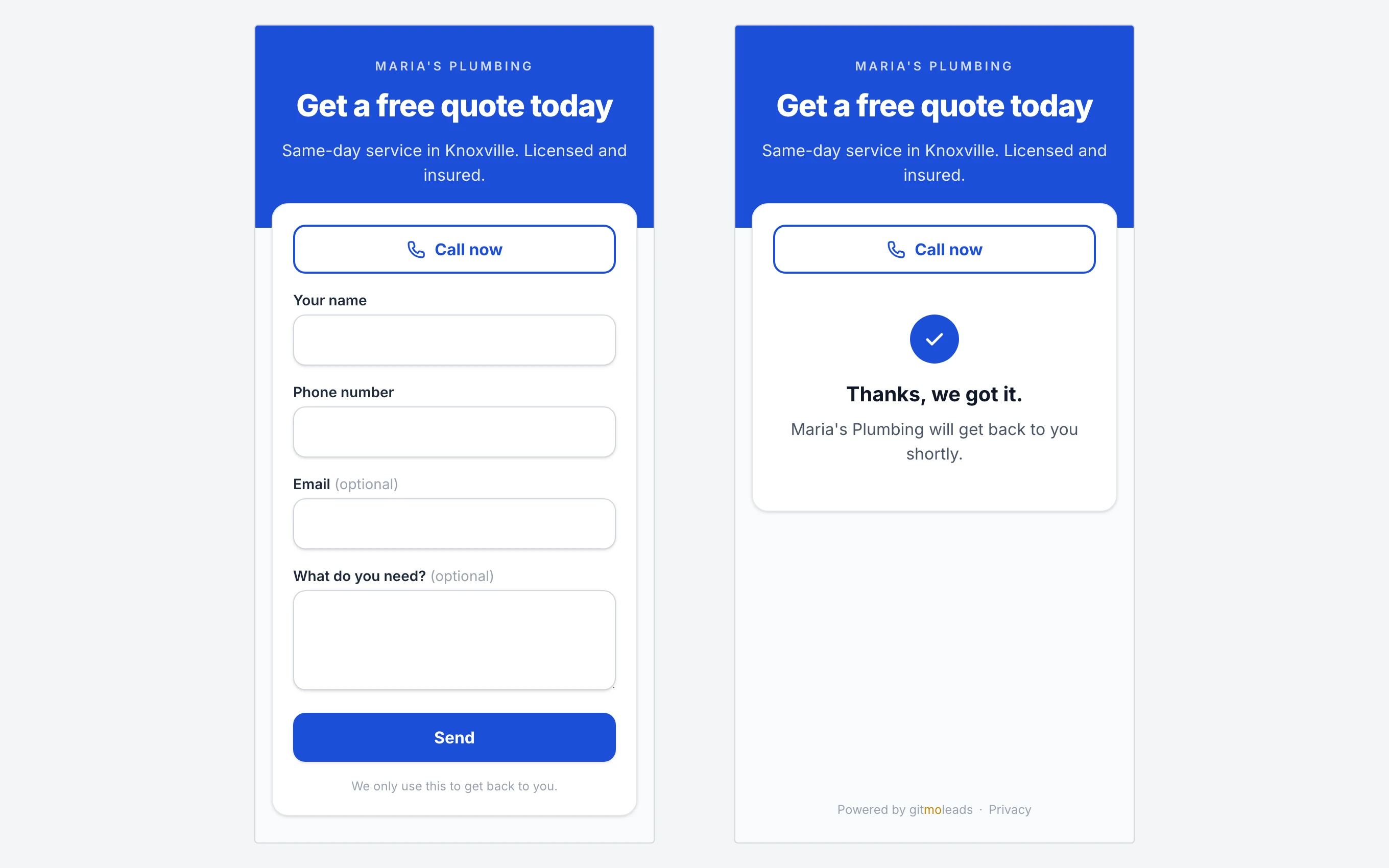
The top of the page is in your color. It shows your business name, the headline, and one line of text. Below it, a card holds the Call now button, when you set a phone number, and the form. After the customer taps Send, the page says: "Thanks, we got it. Maria's Plumbing will get back to you shortly."
Edit the page
Open the code in the dashboard and go to Where does it point? with Lead page selected.
- Business name. One name for your whole account. A change here shows on all your lead pages.
- Headline. The default is "Get a free quote".
- One line under the headline. Up to 300 characters. For example: "Same-day service in Knoxville. Licensed and insured."
- Phone for a Call now button. Optional. It shows a large call button above the form.
- Color. Yellow, black, blue, green, red, or orange.
- Questions on the form. See below.
Tap Save. The page changes right away. The printed code stays the same.
The questions
The form has four questions: Your name, Phone number, Email, and What do you need? By default the name and the phone number are required, and the other two are optional. For each question you can:
- Change the label to your own words, like "Best number to reach you".
- Untick it to remove it from the form.
- Tick required, and the customer must answer it.
At least one question stays on. You cannot add a fifth question.
Where leads go
- Email, right away. The lead goes to the email on your account, from no-reply@gitmoleads.com. The subject is "New lead from your Truck 1 tailgate page: Dana R." The email has the answers, a Call button with the customer's number, and a link to the dashboard. When the customer gave an email, a reply to the lead email goes straight to them.
- The dashboard. The code page lists the leads, newest first, with the phone number and the email as links you can tap. Download CSV saves every lead of that code.
- Not saved yet? If your account has no email, leads wait in the dashboard, and the yellow box counts them: "2 leads are waiting here." The moment you save the account, they are emailed to you.
Spam
A hidden field on the form catches most bots. One connection can send at most 5 messages in 10 minutes. A message that leaves a required question empty is refused. Some spam can still get through. Delete it and move on. To stop the form, switch the code to Send to a URL.
The customer's details
The name, the phone number, and the message belong to you. We store them to show them in your dashboard and to email them to you. We never contact your customers, and we never sell the data. To remove a lead, email support and we delete it. See the privacy policy.